How to Get Started with Amazon EC2

An individual who uses AI prompts, stack overflow threads and coffee to assemble software that occasionally works as expected...
Introduction to EC2
What is EC2, and why is it important?
Amazon Elastic Compute Cloud (Amazon EC2): A web service offering secure, resizable compute capacity in the cloud.
Benefits:
Scalable Infrastructure: Access reliable and scalable infrastructure on demand. Scale capacity within minutes with a 99.99% availability SLA.
Security: Built-in security for your applications with the AWS Nitro System.
Performance and Cost Optimization: Flexible options like AWS Graviton-based instances, Amazon EC2 Spot instances, and AWS Savings Plans to optimize performance and cost.
EC2 Use Cases
Compute Infrastructure: Deliver secure, reliable, high-performance, and cost-effective compute infrastructure to meet demanding business needs.
HPC Applications: Access the on-demand infrastructure and capacity needed to run high-performance computing (HPC) applications faster and more cost-effectively.
Scalability: Access environments in minutes, dynamically scale capacity as needed, and benefit from AWS’s pay-as-you-go pricing.
Machine Learning Projects: Deliver the broadest choice of compute, networking (up to 400 Gbps), and storage services purpose-built to optimize price performance for machine learning projects.
EC2 Instance Types
General Purpose Instances
Description: Designed to deliver a balance of compute, memory, and network resources.
Use Cases: Suitable for a wide range of applications including web servers, small databases, development and test environments, and more.
Compute Optimized Instances
Description: Provide a higher ratio of compute power to memory.
Use Cases: Excel in workloads that require high-performance processing such as batch processing, scientific modeling, gaming servers, and high-performance web servers.
Memory Optimized Instances
Description: Designed to handle memory-intensive workloads.
Use Cases: Suitable for applications that require large amounts of memory, such as in-memory databases, real-time big data analytics, and high-performance computing.
Storage Optimized Instances
Description: Optimized for applications that require high, sequential read and write access to large datasets.
Use Cases: Ideal for tasks like data warehousing, log processing, and distributed file systems.
Accelerated Computing Instances
Description: Typically come with one or more types of accelerators, such as Graphics Processing Units (GPUs), Field Programmable Gate Arrays (FPGAs), or custom Application Specific Integrated Circuits (ASICs).
Use Cases: These accelerators offload computationally intensive tasks from the main CPU, enabling faster and more efficient processing for specific workloads.
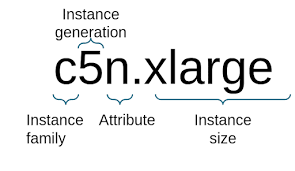
Instance Families
C – Compute: Optimized for compute-intensive applications.
D – Dense storage: Ideal for workloads that require high sequential read and write access to large data sets.
F – FPGA: Designed for use cases that benefit from customizable hardware acceleration.
G – GPU: Suitable for graphics-intensive applications.
Hpc – High performance computing: For applications that require high-performance computing resources.
I – I/O: Optimized for high, random I/O performance.
Inf – AWS Inferentia: Designed for machine learning inference.
M – Most scenarios: General-purpose instances for a broad range of applications.
P – GPU: For general-purpose GPU applications.
R – Random access memory: Optimized for memory-intensive applications.
T – Turbo: Designed for burstable performance instances.
Trn – AWS Tranium: Optimized for training deep learning models.
U – Ultra-high memory: For extremely memory-intensive applications.
VT – Video transcoding: Suitable for video processing and transcoding.
X – Extra-large memory: For applications that require large amounts of memory.
Additional Capabilities
a – AMD processors: Use AMD processors.
g – AWS Graviton processors: Use AWS Graviton processors.
i – Intel processors: Use Intel processors.
d – Instance store volumes: Include instance store volumes.
n – Network and EBS optimized: Optimized for enhanced networking and Amazon EBS performance.
e – Extra storage or memory: Include additional storage or memory.
z – High performance: Provide high performance.
EC2 Instance Basics
Virtual Servers: Understanding the concept of virtual servers and instances.
Key Components: Learn about the key components of an EC2 instance such as AMI (Amazon Machine Image), instance types, and instance states.
Instance Types: Differentiate between On-Demand, Reserved, and Spot instances.
Managing EC2 Instances
Operations: Learn how to start, stop, and terminate instances.
Monitoring: Monitor instance performance and utilization.
Access: Basic troubleshooting and accessing instances using SSH (Secure Shell)


